
Softether VPN Remote Access with Duo Multi-Factor Authentication (MFA)
This guide assumes you have a working Softether VPN server configured for remote access along with LDAP or Active Directory for remote user authentication and a Duo account with your users and their mobile devices pre-populated. If you don't have a Duo account, you can sign up for a free trial on the Duo website. Additionally, you also need to deploy a Duo Authentication Proxy server on your network using Linux or Windows.
This guide specifically focuses on a Duo Authentication Proxy on Linux but it can be easily adapted to a Windows based installation.
If you need to deploy a Softether VPN server you can take a look at our docker compose example to deploy using Docker, Traefik as the reverse proxy and Lets Encrypt support.
Configure Softether Application in Duo Admin Panel
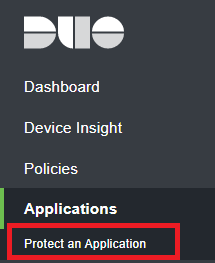
- Login to your Duo Admin Panel and navigate to Applications --> Protect and Application (Figure 1).
Figure 1
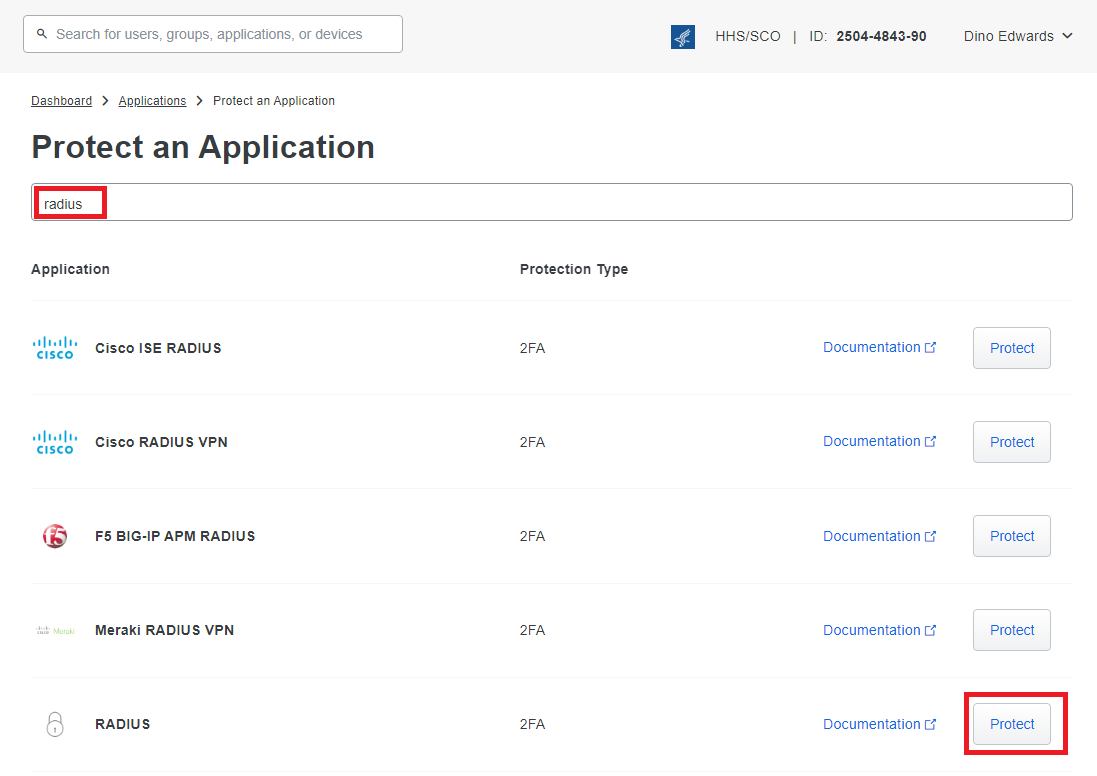
- In the Protect an Application page, enter radius in the Filter by keywords field and click the Protect button to the right of the RADIUS application from the resultant list (Figure 2).
Figure 2
- In the RADIUS application page, copy the Integration key, Secret Key and the API hostname to be used later in the configuration of the Duo Authentication Proxy (Figure 3).
Figure 3

Figure 4
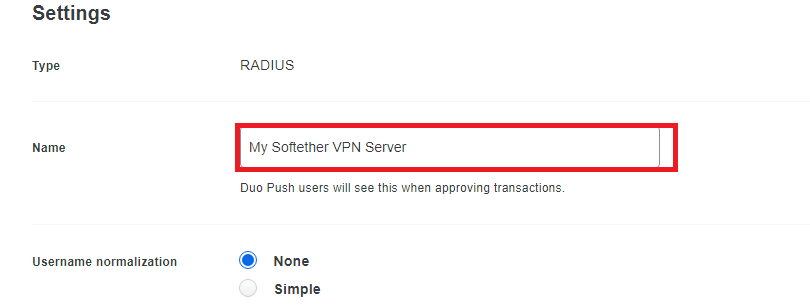
- Ensure you click the Save button on the very bottom of the RADIUS application page.
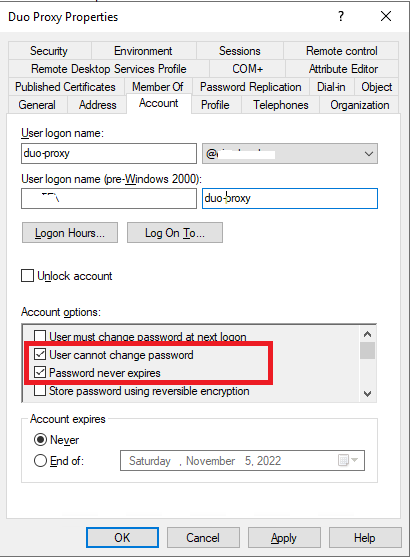
Create an AD service account to enumerate users in Active Directory
Figure 5
Configure Duo Authentication Proxy
The Duo Authentication Proxy integrates with the Duo cloud to perform Duo push notifications, it integrates with LDAP or Active Directory to perform user authentication and it also serves as a RADIUS server which Softether usesutilizes to authenticate users. You could use a separate RADIUS server to integrate with LDAP/Active Directory and configure Duo Authentication Proxy with it but that's outside the scope of this guide.
If you followed the New Proxy Install Duo documentation, the proxy gets installed in the /opt/duoauthproxy directory by default. If you did a custom installation, adjust the paths below as necessary.
vi /opt/duoauthproxy/conf/authproxy.cfg
[ad_client]
host=<AD_DOMAIN_CONTROLLER>
service_account_username=<AD_DUO_SERVICE_ACCOUNT_USERNAME>
service_account_password=<AD_DUO_SERVICE_ACCOUNT_PASSWORD>
search_dn=DC=DOMAIN,DC=TLD

[radius_server_auto]
ikey=<DUO_INTEGRATION_KEY>
skey=<DUO_SECRET_KEY>
api_host=<DUO_API_HOSTNAME>
radius_ip_1=<SOFTETHER_VPN_SERVER_IP>
radius_secret_1=<RADIUS_SHARED_SECRET>
failmode=safe
client=ad_client
port=1812