Original inspiration for the script came from a post on the [Veeam forums](https://forums.veeam.com/veeam-agents-for-linux-mac-aix-solaris-f41/scripting-t36789.html#p207902) by **davide.depaoli** with some minor modifications from me mainly the use of [**sendemail**](https://www.kali.org/tools/sendemail/) to send out the notifications.
- Setup a new backup job with the initial Veeam Agent setup wizard ensuring that you do NOT schedule the job (**Figure 1**). **Figure 1** [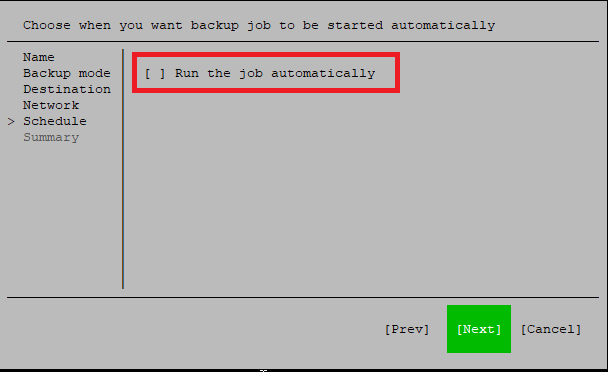](https://docs.deeztek.com/uploads/images/gallery/2023-03/pliimage.png) - Alternatively, you can configure an existing job by issuing the command below: ``` veeamconfig ui ``` - Select the job you wish to configure and click on **C** to configure (**Figure 2**): **Figure 2** [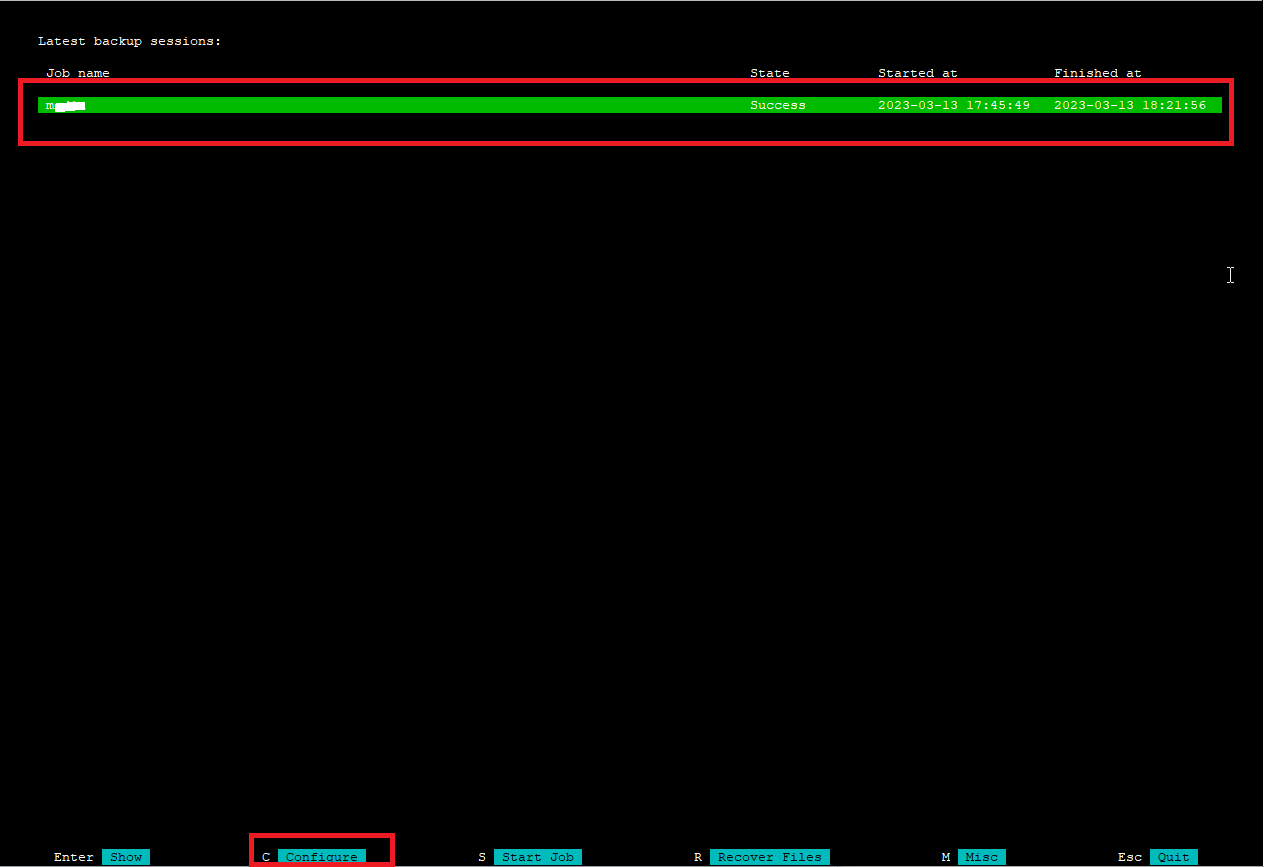](https://docs.deeztek.com/uploads/images/gallery/2023-03/KhFimage.png) - List the jobs in Veeam by issuing the following command: ``` veeamconfig job list ```If you get the error: **This operation is not permitted if management mode is \[Job\]** then change the Veeam to standalone mode by using the following command:
``` veeamconfig mode reset ``` - Locate the job name from the list and make a note of it: ``` Name ID Type Repository Daily {18c2f95b-6fa3-4cc2-acca-ace90b58dcb4} All System Repository_1 ``` - Create a script in your system with the contents below, ensuring you replace the **JOBNAME, SCRIPT\_DIR, smtpusername, smtppassword, smtptls, smtphost, smtpport, emailfrom** and **emailto** variable values with values from your environment. Ensure the **SCRIPT\_DIR** path you choose exists and the script is placed in it: ```bash JOBNAME=veeam_backup_job_name SCRIPT_DIR=/etc/veeam/scripts LOG_DIR=/var/log/veeam/Backup/$JOBNAME JOB_INFO=`veeamconfig job info --name $JOBNAME` #Sendemail Parameters smtpusername=smtp_username smtppassword='smtp_password' smtptls=yes/no/auto smtphost=smtp.domain.tld smtpport=587 emailfrom=someone@domain.tld emailto=someone@domain.tld #Install sendemail and related packages if necessary apt install -y rar sendemail libio-socket-ssl-perl libnet-ssleay-perl perl #start backup job veeamconfig job start --name "$JOBNAME" 1> $SCRIPT_DIR/$JOBNAME.tmp 2> $SCRIPT_DIR/$JOBNAME.err SESSION_ID=`grep ID $SCRIPT_DIR/$JOBNAME.tmp | awk '{print $3}' | sed 's/\[//' | sed 's/\]//' | sed 's/\.//'` SESSION_LOG_DIR=`grep log $SCRIPT_DIR/$JOBNAME.tmp | awk '{print $4}' | sed 's/\[//' | sed 's/\]//' | sed 's/\.//'` LOGFILE=$SESSION_LOG_DIR/Job.log SESSION_INFO=`veeamconfig session info --id $SESSION_ID | grep -v UUID` # check if another job is running if [ -s $JOBNAME.err ] then ERROR_MSG=`grep Error $SCRIPT_DIR/$JOBNAME.err` echo "$ERROR_MSG" | /usr/bin/sendemail -f $emailfrom -t $emailto -u "Veam Agent Job $JOBNAME Error" -m "Veam Agent Job $JOBNAME Error" -s $smtphost:$smtpport -o username=$smtpusername -o password=$smtppassword -o tls=$smtptls fi #check if job is running until [ -z `pgrep veeamjobman` ] do echo "job is running" > /dev/null done #check and set the exit status of the job STATUS=`veeamconfig session info --id $SESSION_ID | grep State | awk '{print $2}'` if [ "$STATUS" == "Warning" ]; then WARN_MSG=`veeamconfig session log --id $SESSION_ID | grep warn | awk '{print $6,$7,$8,$9}'` echo -e "Job $JOBNAME Successful with following $STATUS:\n\n$WARN_MSG\n\nJOB INFO:\n$JOB_INFO" | /usr/bin/sendemail -f $emailfrom -t $emailto -u "Veam Agent Job $JOBNAME $STATUS" -m "Veam Agent Job $JOBNAME $STATUS" -a $LOGFILE -s $smtphost:$smtpport -o username=$smtpusername -o password=$smtppassword -o tls=$smtptls fi if [ "$STATUS" == "Failed" ]; then echo -e "Job $JOBNAME $STATUS. See attached logfile for error details.\n\nJOB INFO:\n$JOB_INFO" | /usr/bin/sendemail -f $emailfrom -t $emailto -u "Veam Agent Job $JOBNAME $STATUS" -m "Veam Agent Job $JOBNAME $STATUS" -a $LOGFILE -s $smtphost:$smtpport -o username=$smtpusername -o password=$smtppassword -o tls=$smtptls fi if [ "$STATUS" == "Success" ]; then echo -e "Job $JOBNAME $STATUS.\n\nJOB INFO:\n$JOB_INFO" | /usr/bin/sendemail -f $emailfrom -t $emailto -u "Veam Agent Job $JOBNAME $STATUS" -m "Veam Agent Job $JOBNAME $STATUS" -s $smtphost:$smtpport -o username=$smtpusername -o password=$smtppassword -o tls=$smtptls fi rm -f $SCRIPT_DIR/$JOBNAME.tmp $SCRIPT_DIR/$JOBNAME.err ``` - Ensure you make the script executable: ``` chmod +x /etc/veeam/scripts/veeam_backup.sh ``` - Test by running the script manually and if the job and the e-mail notification is successful, schedule the script with crontab and set the days/times as per your requirements: ``` # m h dom mon dow command 30 00 * * * /etc/veeam/scripts/veeam_backup.sh ```