# How to Create a Spam Report Button in Outlook

### <span class="text-4505230f--TextH400-3033861f--textContentFamily-49a318e1"><span data-key="f12c883121b04eaf8fb68a478bc4544c">E-mail Spam Definition</span></span>

***"Spam is any kind of unwanted, unsolicited digital communication, often an email, that gets sent out in bulk."***

The main takeaway from the definition above is the word "**unsolicited**". This means that any bulk e-mail that you receive from an entity that you have signed up with and have given them your e-mail address is generally **not** considered Spam. In those cases, simply **unsubscribing** from their e-mail lists/newsletters usually stops the e-mails.

### <span class="text-4505230f--TextH400-3033861f--textContentFamily-49a318e1"><span data-key="f12c883121b04eaf8fb68a478bc4544c">Introduction</span></span>

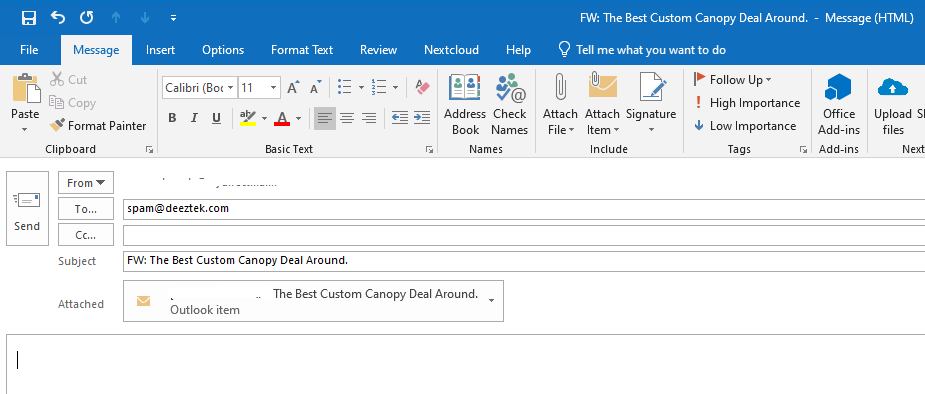
<span class="text-4505230f--TextH400-3033861f--textContentFamily-49a318e1"><span data-key="f12c883121b04eaf8fb68a478bc4544c">When you receive an e-mail that you believe should had been quarantined or marked as **\[SUSPECTED SPAM\]**, you can typically forward that e-mail as an attachment to our team at </span>[<span data-key="4c74c53ef9c34f129f0b8e43d35b368c">spam@deeztek.com</span>](mailto:%20spam@deeztek.com)<span data-key="9d43155b07f3493bac11ddc320f32ae7">. This usually involves selecting the e-mail in question, clicking on **More** in the **Respond** Outlook ribbon toolbar, selecting **Forward as Attachment** (**Figure 1**) filling out the **To** field with **spam@deeztek.com** and clicking **Send** (**Figure 2**).</span></span>

<span class="text-4505230f--TextH400-3033861f--textContentFamily-49a318e1"><span data-key="f57d658bbad240f5a8e0ef847f01197d">**Figure 1**</span></span>

<div data-key="6920db13e32346e49f0f729693b44841" data-slate-void="true" id="bkmrk-"><div>[![figure1.png](https://docs.deeztek.com/uploads/images/gallery/2020-11/scaled-1680-/figure1.png)](https://docs.deeztek.com/uploads/images/gallery/2020-11/figure1.png)</div></div><span class="text-4505230f--TextH400-3033861f--textContentFamily-49a318e1"><span data-key="ab208d6fa8a244af8b7ad093a2a529a8">**Figure 2**</span></span>

<div data-key="ecb93f141ad44fa18665a09e97c8874a" data-slate-void="true" id="bkmrk--0"><div>[![figure2.png](https://docs.deeztek.com/uploads/images/gallery/2020-11/scaled-1680-/figure2.png)](https://docs.deeztek.com/uploads/images/gallery/2020-11/figure2.png)</div></div><span class="text-4505230f--TextH400-3033861f--textContentFamily-49a318e1"><span data-key="fadd95b3e330432dab931b1bcbac5a86">While this is not very time consuming, you can simplify this process by creating a **SPAM** button in Outlook to speed up the process.</span></span>

### <span class="text-4505230f--TextH400-3033861f--textContentFamily-49a318e1"><span data-key="fadd95b3e330432dab931b1bcbac5a86">Create a Spam Report Button</span></span>

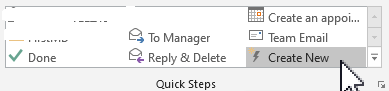
<span class="text-4505230f--TextH400-3033861f--textContentFamily-49a318e1"><span data-key="0020eee409ba47e8b764b0835f7034b9">In the Outlook **Quick Steps** ribbon toolbar, click on **Create New** (**Figure 3**).</span></span>

<span class="text-4505230f--TextH400-3033861f--textContentFamily-49a318e1"><span data-key="c0d13f8485ba462d923ef999a4c8c9f2">**Figure 3**</span></span>

<div data-key="a4080a4612d14f96b3402bd7aa0e79a5" data-slate-void="true" id="bkmrk--1"><div>[![figure3.png](https://docs.deeztek.com/uploads/images/gallery/2020-11/scaled-1680-/figure3.png)](https://docs.deeztek.com/uploads/images/gallery/2020-11/figure3.png)</div></div><span class="text-4505230f--TextH400-3033861f--textContentFamily-49a318e1"><span data-key="f1ea6090f0e14fffaabab7a0a9937caf">In the **Edit Quick Step** window, set the following:</span></span>

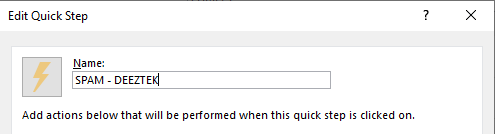
<span class="text-4505230f--TextH400-3033861f--textContentFamily-49a318e1"><span data-key="abaa88b26d1a43c0bf40cd165312c12b">Set the **Name:** field to **SPAM - DEEZTEK** (**Figure 4**).</span></span>

<span class="text-4505230f--TextH400-3033861f--textContentFamily-49a318e1"><span data-key="930b386a88354da4b0939c603773841f">**Figure 4**</span></span>

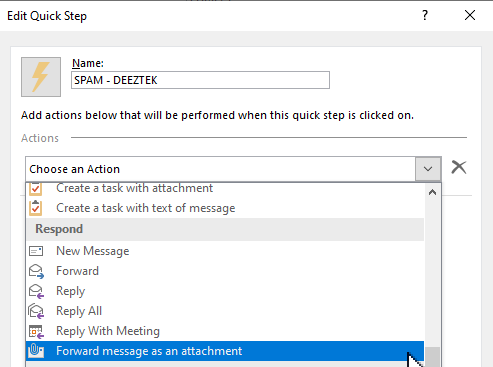
<div data-key="72861793845a459e8d5de70fd4885942" data-slate-void="true" id="bkmrk--2">[![figure4.png](https://docs.deeztek.com/uploads/images/gallery/2020-11/scaled-1680-/figure4.png)](https://docs.deeztek.com/uploads/images/gallery/2020-11/figure4.png)</div><span class="text-4505230f--TextH400-3033861f--textContentFamily-49a318e1"><span data-key="9016ab962f1f4f7392f1fc75cb7f21ec">Click the **Choose an Action** drop-down and select **Forward message as an attachment** (**Figure 5**).</span></span>

<span class="text-4505230f--TextH400-3033861f--textContentFamily-49a318e1"><span data-key="2316f22184444b6eb7a3e3f673fb0255">**Figure 5**</span></span>

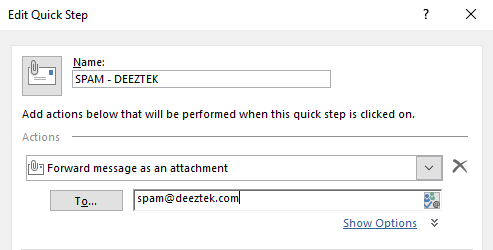
<div data-key="a47ea717252941ef9989a5a5e6324fbc" data-slate-void="true" id="bkmrk--3"><div>[![figure5.png](https://docs.deeztek.com/uploads/images/gallery/2020-11/scaled-1680-/figure5.png)](https://docs.deeztek.com/uploads/images/gallery/2020-11/figure5.png)</div></div><span class="text-4505230f--TextH400-3033861f--textContentFamily-49a318e1"><span data-key="744841c768dc458db2793bd1d72e12b4">In the **To...** field enter **spam@deeztek.com** (**Figure 6**)**.**</span></span>

<span class="text-4505230f--TextH400-3033861f--textContentFamily-49a318e1"><span data-key="c9a1ce348d5349ca9a818393df6a531f">**Figure 6**</span></span>

<div data-key="376d373d9f11470497a4062ef9b9b325" data-slate-void="true" id="bkmrk--4"><div>[![figure6.png](https://docs.deeztek.com/uploads/images/gallery/2020-11/scaled-1680-/figure6.png)](https://docs.deeztek.com/uploads/images/gallery/2020-11/figure6.png)</div></div><span class="text-4505230f--TextH400-3033861f--textContentFamily-49a318e1"><span data-key="fa850803b674400ab26a4bc2cee3178a">**​**</span></span>

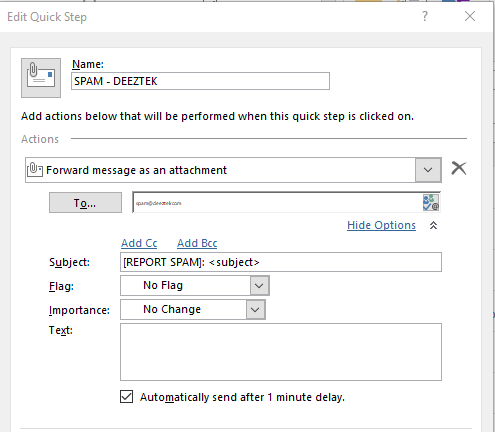
<span class="text-4505230f--TextH400-3033861f--textContentFamily-49a318e1"><span data-key="10ff59b77d0e423caad4ba34d0882868">Click on **Show Options**, in the **Subject:** field enter **\[REPORT SPAM\]: &lt;subject&gt;** and check the **Automatically send after 1 minute delay** checkbox (**Figure 7**).</span></span>

<span class="text-4505230f--TextH400-3033861f--textContentFamily-49a318e1"><span data-key="39342e4e278f424f989f453239a9da9b">**Figure 7**</span></span>

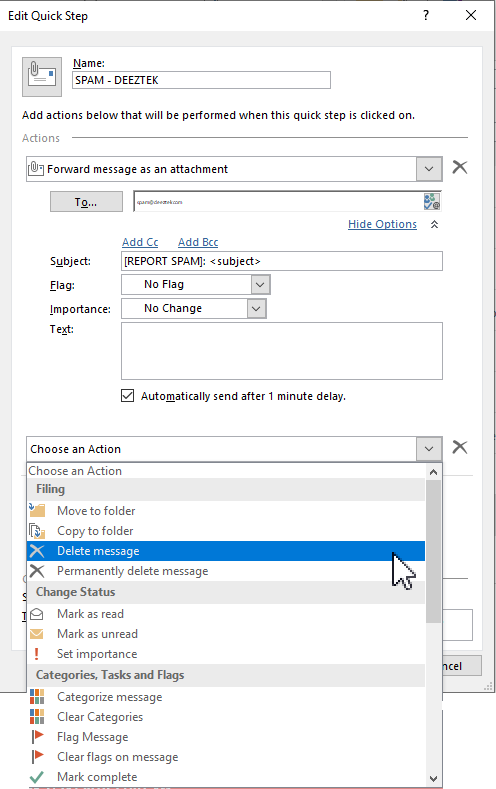
<div data-key="6393cc839d8441d1b5fbb347ce9c8b4c" data-slate-void="true" id="bkmrk--5"><div>[![figure7.png](https://docs.deeztek.com/uploads/images/gallery/2020-11/scaled-1680-/figure7.png)](https://docs.deeztek.com/uploads/images/gallery/2020-11/figure7.png)</div></div><span class="text-4505230f--TextH400-3033861f--textContentFamily-49a318e1"><span data-key="ef4a67d286dc453ea05289416d8f680a">Next, click on **Add Action** button and in the **Choose an Action** drop-down select the **Delete message** action (**Figure 8**).</span></span>

<span class="text-4505230f--TextH400-3033861f--textContentFamily-49a318e1"><span data-key="9ed4b60b053446ad88333de92870e7e8">**Figure 8**</span></span>

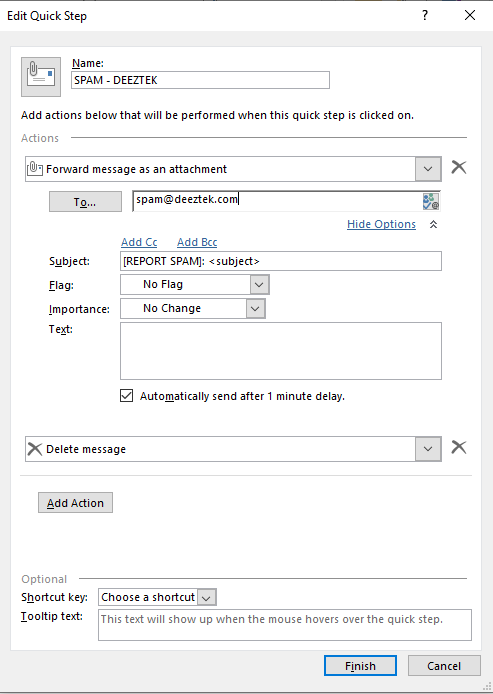
<div data-key="392e1ea84d8042a4920bb35e5d8b4bd8" data-slate-void="true" id="bkmrk--6"><div>[![figure8.png](https://docs.deeztek.com/uploads/images/gallery/2020-11/scaled-1680-/figure8.png)](https://docs.deeztek.com/uploads/images/gallery/2020-11/figure8.png)</div></div><span class="text-4505230f--TextH400-3033861f--textContentFamily-49a318e1"><span data-key="d442c76fdf7d43e58a5d458641626f4e">Finally, click the **Finish** button (**Figure 9**).</span></span>

<span class="text-4505230f--TextH400-3033861f--textContentFamily-49a318e1"><span data-key="f5b385f4841848ed9904e475af9ac7ba">**Figure 9**</span></span>

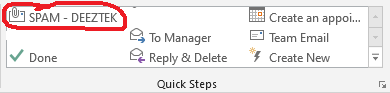
<div data-key="f0ed1a4e52b246ec9c15ca6367bdd98b" data-slate-void="true" id="bkmrk--7"><div>[![figure9.png](https://docs.deeztek.com/uploads/images/gallery/2020-11/scaled-1680-/figure9.png)](https://docs.deeztek.com/uploads/images/gallery/2020-11/figure9.png)</div></div><span class="text-4505230f--TextH400-3033861f--textContentFamily-49a318e1"><span data-key="b49fb30311b44004be0d86ab9e3b437f">The button you just created will be visible in the **Quick Steps** ribbon toolbar in your Outlook window (**Figure 10**)</span></span>

<span class="text-4505230f--TextH400-3033861f--textContentFamily-49a318e1"><span data-key="e952ff29780d415c9c219596b57bf706">**Figure 10**</span></span>

<div data-key="aef86ecb27ab4a5cb85c0cade95acc2a" data-slate-void="true" id="bkmrk--8"><div>[![figure10.png](https://docs.deeztek.com/uploads/images/gallery/2020-11/scaled-1680-/figure10.png)](https://docs.deeztek.com/uploads/images/gallery/2020-11/figure10.png)</div><div></div></div>