# How to Create a Not Spam Report Button in Outlook

### Introduction

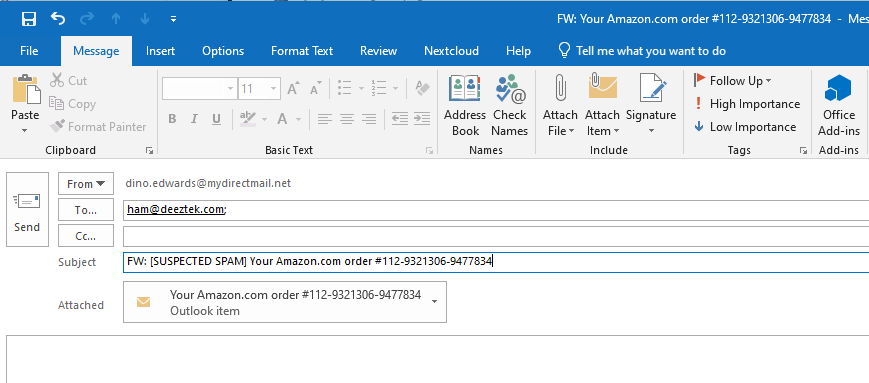
<span class="text-4505230f--TextH400-3033861f--textContentFamily-49a318e1"><span data-key="3a340ad52f9d408e87fc2c69a10a834f">When you receive an e-mail that you believe should not had been marked as **\[SUSPECTED SPAM\]**, you can typically forward that e-mail as an attachment to our team to </span>[<span data-key="385d252fb0984155acbd3d1254f9ed1d">ham@deeztek.com</span>](mailto:ham@deeztek.com)<span data-key="a283707090d446f5b5ec750305f3a516">. This usually involves selecting the e-mail in question, clicking on **More** in the **Respond** Outlook ribbon toolbar, selecting **Forward as Attachment** (**Figure 1**) filling out the **To** field with **ham@deeztek.com** and clicking **Send** (**Figure 2**).</span></span>

<span class="text-4505230f--TextH400-3033861f--textContentFamily-49a318e1"><span data-key="029cda08f84e43919d2f4f71e0f4596c">**Figure 1**</span></span>

<div data-key="bec8f5bafc284e5b8df18352be7d3b25" data-slate-void="true" id="bkmrk-"><div>[![figure1.png](https://docs.deeztek.com/uploads/images/gallery/2020-11/scaled-1680-/a6efigure1.png)](https://docs.deeztek.com/uploads/images/gallery/2020-11/a6efigure1.png)</div></div><span class="text-4505230f--TextH400-3033861f--textContentFamily-49a318e1"><span data-key="bafde4eed76b452fa162102d768d295b">**Figure 2**</span></span>

<div data-key="21d4bf947ab04d8bb862e3d5a16b2c5d" data-slate-void="true" id="bkmrk--0"><div>[![figure2.png](https://docs.deeztek.com/uploads/images/gallery/2020-11/scaled-1680-/uU4figure2.png)](https://docs.deeztek.com/uploads/images/gallery/2020-11/uU4figure2.png)</div></div><span class="text-4505230f--TextH400-3033861f--textContentFamily-49a318e1"><span data-key="c7b16f6a47e541539a82e37b3dc0b011">While this is not very time consuming, you can simplify this process by creating a **NOT SPAM** button in Outlook to speed up the process.</span></span>

### <span class="text-4505230f--TextH400-3033861f--textContentFamily-49a318e1"><span data-key="c7b16f6a47e541539a82e37b3dc0b011">Create a Not Spam Report Button</span></span>

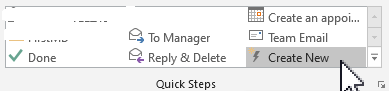
<span class="text-4505230f--TextH400-3033861f--textContentFamily-49a318e1"><span data-key="8139d5d5eb1a42439d352fb0cbdf4423">In the Outlook **Quick Steps** ribbon toolbar, click on **Create New** (**Figure 3**).</span></span>

<span class="text-4505230f--TextH400-3033861f--textContentFamily-49a318e1"><span data-key="aaeece1824044d2fba9fb82b36156fbb">**Figure 3**</span></span>

<div data-key="260564e26e404386a0a8b4a926389e22" data-slate-void="true" id="bkmrk--1"><div>[![figure3.png](https://docs.deeztek.com/uploads/images/gallery/2020-11/scaled-1680-/pwyfigure3.png)](https://docs.deeztek.com/uploads/images/gallery/2020-11/pwyfigure3.png)</div></div><span class="text-4505230f--TextH400-3033861f--textContentFamily-49a318e1"><span data-key="433a13bfe0274ec48058295ab0a6e9f4">In the **Edit Quick Step** window, set the following:</span></span>

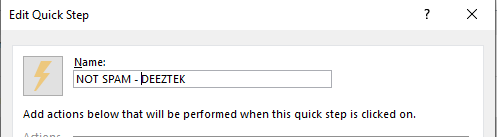
<span class="text-4505230f--TextH400-3033861f--textContentFamily-49a318e1"><span data-key="75906090a24542a59f533fc37a67077c">Set the **Name:** field to **NOT SPAM - DEEZTEK** (**Figure 4**).</span></span>

<span class="text-4505230f--TextH400-3033861f--textContentFamily-49a318e1"><span data-key="344a2c7d0d9e4bac866344f76f00d526">**Figure 4**</span></span>

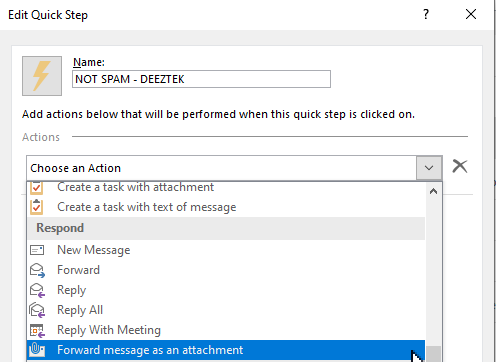
<div data-key="289b21da4e654d4eaa44bef782e18e90" data-slate-void="true" id="bkmrk--2"><div>[![figure4.png](https://docs.deeztek.com/uploads/images/gallery/2020-11/scaled-1680-/Tvdfigure4.png)](https://docs.deeztek.com/uploads/images/gallery/2020-11/Tvdfigure4.png)</div></div><span class="text-4505230f--TextH400-3033861f--textContentFamily-49a318e1"><span data-key="2555ec337e474b1fa3865feeadeb8eb0">Click the **Choose an Action** drop-down and select **Forward message as an attachment** (**Figure 5**).</span></span>

<span class="text-4505230f--TextH400-3033861f--textContentFamily-49a318e1"><span data-key="dccc7392361b497bb291b84f06c7f55a">**Figure 5**</span></span>

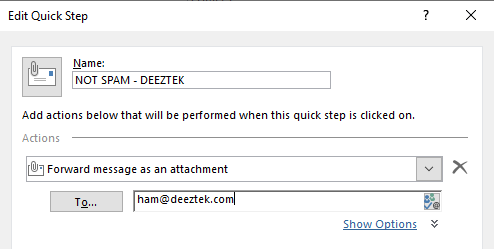
<div data-key="89c1e5c6df214fa6ad194c743900694d" data-slate-void="true" id="bkmrk--3"><div>[![figure5.png](https://docs.deeztek.com/uploads/images/gallery/2020-11/scaled-1680-/0E4figure5.png)](https://docs.deeztek.com/uploads/images/gallery/2020-11/0E4figure5.png)</div></div><span class="text-4505230f--TextH400-3033861f--textContentFamily-49a318e1"><span data-key="3afef95f70a14d3fa579bb01832393ac">In the **To...** field enter **ham@deeztek.com** (**Figure 6**)**.**</span></span>

<span class="text-4505230f--TextH400-3033861f--textContentFamily-49a318e1"><span data-key="e7fa60c100014178b1959911e240a46e">**Figure 6**</span></span>

<div data-key="43c2054f79f14711be82b2c1d882c69b" data-slate-void="true" id="bkmrk--4"><div>[![figure6.png](https://docs.deeztek.com/uploads/images/gallery/2020-11/scaled-1680-/K9vfigure6.png)](https://docs.deeztek.com/uploads/images/gallery/2020-11/K9vfigure6.png)</div></div><span class="text-4505230f--TextH400-3033861f--textContentFamily-49a318e1"><span data-key="3d2cdec75d3647319ff9ae4754465c6d">**​**</span></span>

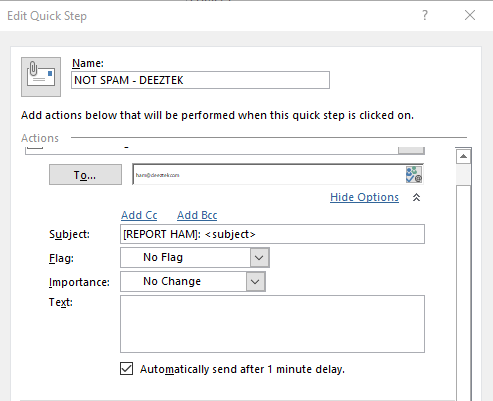
<span class="text-4505230f--TextH400-3033861f--textContentFamily-49a318e1"><span data-key="35da47a61d2a4984adbd36f909d1d3f0">Click on **Show Options**, in the **Subject:** field enter **\[REPORT HAM\]: &lt;subject&gt;** and check the **Automatically send after 1 minute delay** checkbox (**Figure 7**).</span></span>

<span class="text-4505230f--TextH400-3033861f--textContentFamily-49a318e1"><span data-key="08b888f150934d24bec80687cc2f352c">**Figure 7**</span></span>

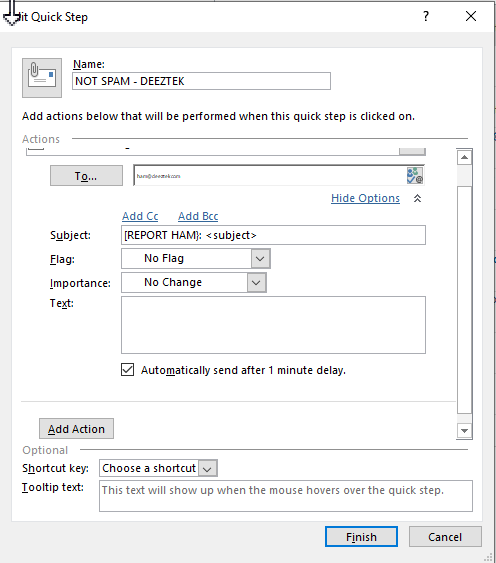
<div data-key="fb5d71a8f2f741e1ac1effc5fd1d0ae1" data-slate-void="true" id="bkmrk--5"><div>[![figure7.png](https://docs.deeztek.com/uploads/images/gallery/2020-11/scaled-1680-/Chrfigure7.png)](https://docs.deeztek.com/uploads/images/gallery/2020-11/Chrfigure7.png)</div></div><div data-key="cce0812443374582811ef400fb9e58c6" data-slate-void="true" id="bkmrk--6"></div><span class="text-4505230f--TextH400-3033861f--textContentFamily-49a318e1"><span data-key="6122b1b79cba4a518c2386fed9f08456">Finally, click the **Finish** button (**Figure 8**).</span></span>

<span class="text-4505230f--TextH400-3033861f--textContentFamily-49a318e1"><span data-key="5dbccf2d499042af99e7a6db868ba729">**Figure 8**</span></span>

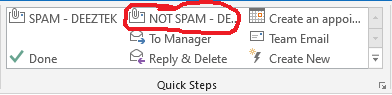
<div data-key="5add5f75883047dda7de16b669af293d" data-slate-void="true" id="bkmrk--7">[![figure9.png](https://docs.deeztek.com/uploads/images/gallery/2020-11/scaled-1680-/kEZfigure9.png)](https://docs.deeztek.com/uploads/images/gallery/2020-11/kEZfigure9.png)</div><span class="text-4505230f--TextH400-3033861f--textContentFamily-49a318e1"><span data-key="20748ccc9dd7408bad9f291034982da9">The button you just created will be visible in the **Quick Steps** ribbon toolbar in your Outlook window (**Figure 10**)</span></span>

<span class="text-4505230f--TextH400-3033861f--textContentFamily-49a318e1"><span data-key="e9b0de1840434a86897606f59cbc72b7">**Figure 10**</span></span>

<div data-key="832c4ab690014b2cab9e581923519ad2" data-slate-void="true" id="bkmrk--8"><div>[![figure10.png](https://docs.deeztek.com/uploads/images/gallery/2020-11/scaled-1680-/kpifigure10.png)](https://docs.deeztek.com/uploads/images/gallery/2020-11/kpifigure10.png)</div><div></div></div>