# Change Hosted Exchange Mailbox Password

1. <span class="text-4505230f--TextH400-3033861f--textContentFamily-49a318e1"><span data-key="edb03bff18504a1290255d6fc2711d1f">Access Outlook Web at [https://ex.mail.ovh.ca](https://ex.mail.ovh.ca)</span></span>
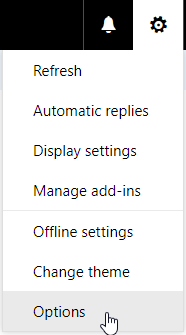
2. <span class="text-4505230f--TextH400-3033861f--textContentFamily-49a318e1"><span data-key="23732fd14ffe49eca3807c8c07d4edb7">After succesful logon, click on the </span><span data-key="39502832c918457689811596ea9acab1" data-slate-void="true"><span class="reset-3c756112--frameInlineVoid-73b6a96b" data-key="39502832c918457689811596ea9acab1">![](https://www.deeztek.com/default/assets/File/gearicon.png)</span></span><span data-key="d07907e9070e4781a2529571abedf80f"> icon on the top right-hand corner.</span></span>
3. <span class="text-4505230f--TextH400-3033861f--textContentFamily-49a318e1"><span data-key="bdf16ae4bef64024970c7ff4952ca01d">On the resultant menu, click on **Options** (**Figure 1**).</span></span>

<span class="text-4505230f--TextH400-3033861f--textContentFamily-49a318e1"><span data-key="40cd8b4da20241c099354d4f13f7595a">**Figure 1**</span></span>

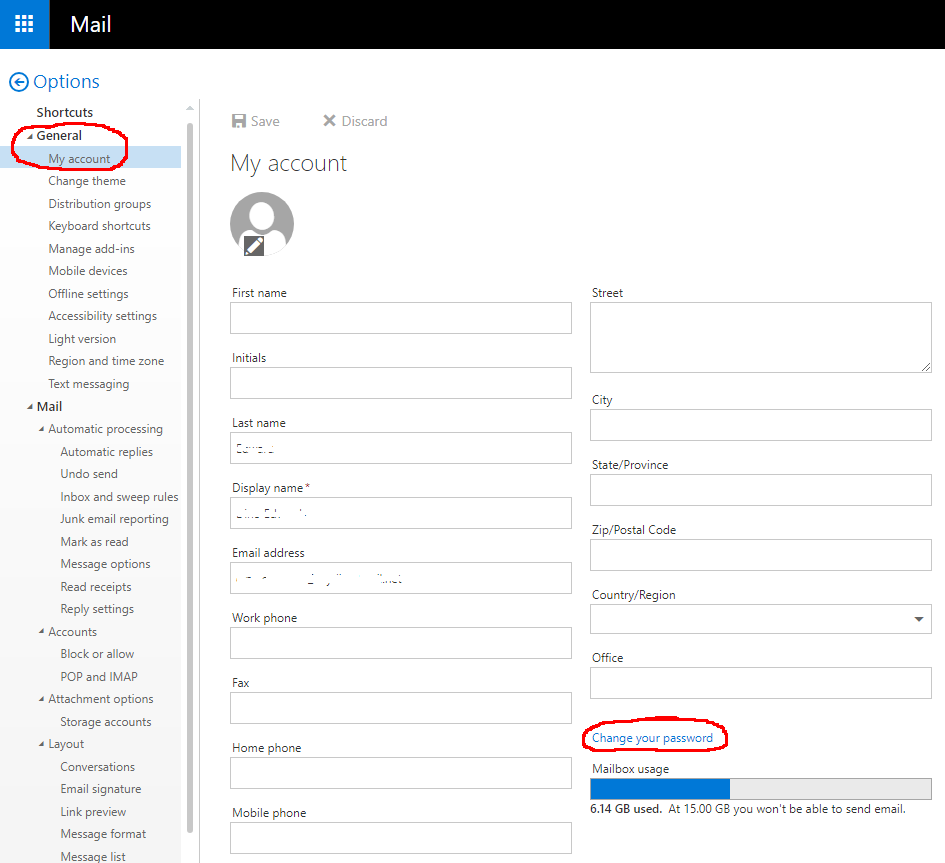
<div data-key="a35bf37077b844f79ab1268f750bc7e7" data-slate-void="true" id="bkmrk-"><div>[![figure1(3).png](https://docs.deeztek.com/uploads/images/gallery/2020-11/scaled-1680-/figure13.png)](https://docs.deeztek.com/uploads/images/gallery/2020-11/figure13.png)</div></div>1. <span class="text-4505230f--TextH400-3033861f--textContentFamily-49a318e1"><span data-key="1ff8b343bc974406bd2b84c53a198b17">In the **Options** page, click on **General** --&gt; **My Account** --&gt; **Change your password** (**Figure 2**).</span></span>

<span class="text-4505230f--TextH400-3033861f--textContentFamily-49a318e1"><span data-key="ba29246cf6044a5fa3b13367144242e5">**Figure 2**</span></span>

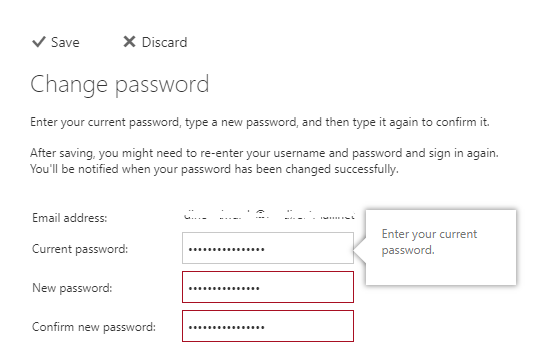
<div data-key="4317b47d664146c5827df076219d4765" data-slate-void="true" id="bkmrk--0"><div>[![figure2(2).png](https://docs.deeztek.com/uploads/images/gallery/2020-11/scaled-1680-/figure22.png)](https://docs.deeztek.com/uploads/images/gallery/2020-11/figure22.png)</div></div>1. <span class="text-4505230f--TextH400-3033861f--textContentFamily-49a318e1"><span data-key="6c5fdab661ce41bfb57ac55bd2c2b48b">In the **Change password** page, enter your current password in the **Current password** field, enter the new password in the **New password** field, re-type the new password in the **Confirm new password** field and click the **Save** button (**Figure 3**).</span></span>

<span class="text-4505230f--TextH400-3033861f--textContentFamily-49a318e1"><span data-key="27d3aa11e57e432e9966f062e0684c59">**Important:** Your password must be at least 8 characters, it must contain at least 1 number and 1 special character.</span></span>

<span class="text-4505230f--TextH400-3033861f--textContentFamily-49a318e1"><span data-key="71fa5b130b6b47e8a7ba9c5a429e3e0d">**Figure 3**</span></span>

<div data-key="c6c2d2f4ed184874a29c37027ddf102d" data-slate-void="true" id="bkmrk--1"><div>[![figure3(2).png](https://docs.deeztek.com/uploads/images/gallery/2020-11/scaled-1680-/figure32.png)](https://docs.deeztek.com/uploads/images/gallery/2020-11/figure32.png)</div><div></div></div>