# Hermes SEG Bulk Recipient Import and Delete

Currently, Hermes SEG provides a way to bulk import Internal Recipients through the Administration Console Web GUI only by using Active Directory Integration if you have a Hermes SEG Pro license. However, if Active Directory Integration is not available or possible, there is no way to bulk import or delete Internal recipients through the Administration Console Web GUI. For those cases, we are providing a command line bash script that will enable you to bulk import and bulk delete Internal Recipients that are stored in a .csv file.

As an added benefit, if your mailboxes are stored on a Microsoft Exchange server, we are also providing a [export\_exchange\_mailboxes.ps1](https://docs.deeztek.com/attachments/5) powershell script that will allow you to export all your Exchange mailboxes into a .csv file that you can use to import into Hermes SEG.

### Download Required Files

In a Hermes SEG root command console run the following command to download the required files to a directory of your choice:

```
wget https://raw.githubusercontent.com/deeztek/Hermes-Secure-Email-Gateway/master/dirstructure/opt/hermes/scripts/hermes_bulk_import_delete_recipients.sh \
wget https://raw.githubusercontent.com/deeztek/Hermes-Secure-Email-Gateway/master/dirstructure/opt/hermes/scripts/insert.sql \
wget https://raw.githubusercontent.com/deeztek/Hermes-Secure-Email-Gateway/master/dirstructure/opt/hermes/scripts/delete.sql
```

After running the command above, you will end up with the following files:

- **hermes\_bulk\_import\_delete\_recipients.sh** - Bulk Import/Delete Bash Script
- **insert.sql** - Bulk Import .sql file that **hermes\_bulk\_import\_delete\_recipients.sh** script uses to clean up the imported data and update additional fields in the database for the bulk import to succeed.
- **delete.sql** - Bulk Delete .sql file that **hermes\_bulk\_import\_delete\_recipients.sh** script uses to clean up the imported data and update additional fields in the database for the bulk delete to succeed.

### Perform Bulk Import or Delete

Copy the .csv file containing the e-mail addresses to be imported/deleted to a directory of your choice on the Hermes SEG machine.

<p class="callout warning">The **hermes\_bulk\_import\_delete\_recipients.sh** assumes that the first line of the .csv file will contain a column header and it's already setup to skip the first line during import. If the first line contains an e-mail address that must be imported, then that e-mail address will be skipped.</p>

<p class="callout warning">You must have the domain for each recipient to be imported/deleted already configured under '**Gateway --&gt; Relay Domains**' before attempting to run the **hermes\_bulk\_import\_delete\_recipients.sh** script below.</p>

Run the hermes\_bulk\_import\_delete\_recipients.sh script by running the command below:

```
bash hermes_bulk_import_delete_recipients.sh
```

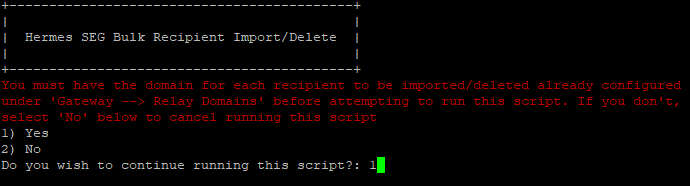
If the domains for every recipient to be imported/deleted are already configured in Hermes SEG under **Gateway --&gt; Relay** Domains, enter **1** to continue in the following prompt (**Figure 1**):

**Figure 1**

[![image-1612117430354.png](https://docs.deeztek.com/uploads/images/gallery/2021-01/scaled-1680-/image-1612117430354.png)](https://docs.deeztek.com/uploads/images/gallery/2021-01/image-1612117430354.png)
In the following prompt enter the MySQL(MariaDB) root password (**Figure 2**):

**Figure 2**

[![image-1612117484215.png](https://docs.deeztek.com/uploads/images/gallery/2021-01/scaled-1680-/image-1612117484215.png)](https://docs.deeztek.com/uploads/images/gallery/2021-01/image-1612117484215.png)

In the following prompt enter the full path and filename to your .csv file (**Figure 3**):

**Figure 3**

[![image-1612117546168.png](https://docs.deeztek.com/uploads/images/gallery/2021-01/scaled-1680-/image-1612117546168.png)](https://docs.deeztek.com/uploads/images/gallery/2021-01/image-1612117546168.png)

In the following prompt enter **1** if you are performing bulk import or enter **2** if you are performing bulk delete (**Figure 4**):

**Figure 4**

[![image-1612117600214.png](https://docs.deeztek.com/uploads/images/gallery/2021-01/scaled-1680-/image-1612117600214.png)](https://docs.deeztek.com/uploads/images/gallery/2021-01/image-1612117600214.png)

If the operation was successful, you should get an output similar to below depending on the operation you chose above (**Figure 5**):

**Figure 5**

[![image-1612117684714.png](https://docs.deeztek.com/uploads/images/gallery/2021-01/scaled-1680-/image-1612117684714.png)](https://docs.deeztek.com/uploads/images/gallery/2021-01/image-1612117684714.png)

Navigate to **Gateway --&gt; Internal Recipients** in the Hermes SEG **Administration Console** Web GUI.

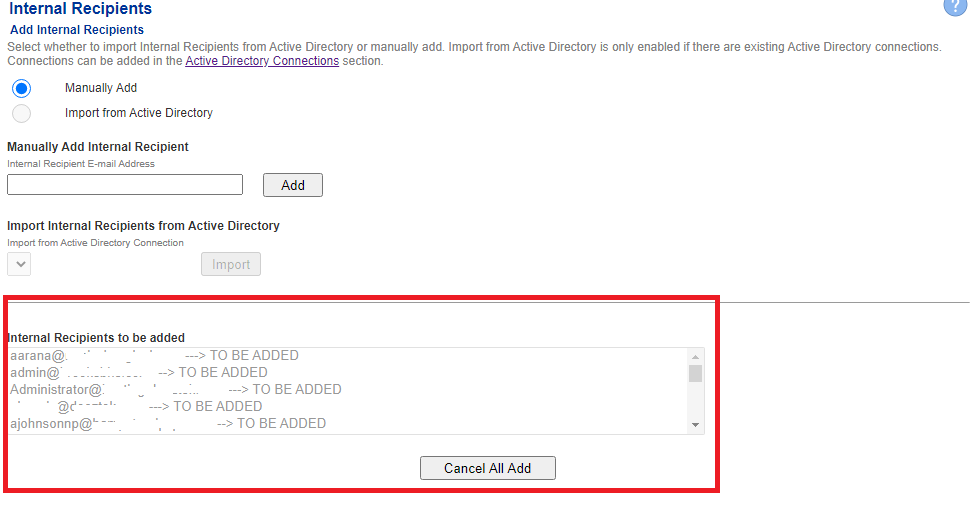
If you selected **Import**, you should have a listing of the e-mail addresses contained in your .csv file under the **Internal Recipients to be added** section (**Figure 6**)

**Figure 6**

[![image-1612106468716.png](https://docs.deeztek.com/uploads/images/gallery/2021-01/scaled-1680-/image-1612106468716.png)](https://docs.deeztek.com/uploads/images/gallery/2021-01/image-1612106468716.png)
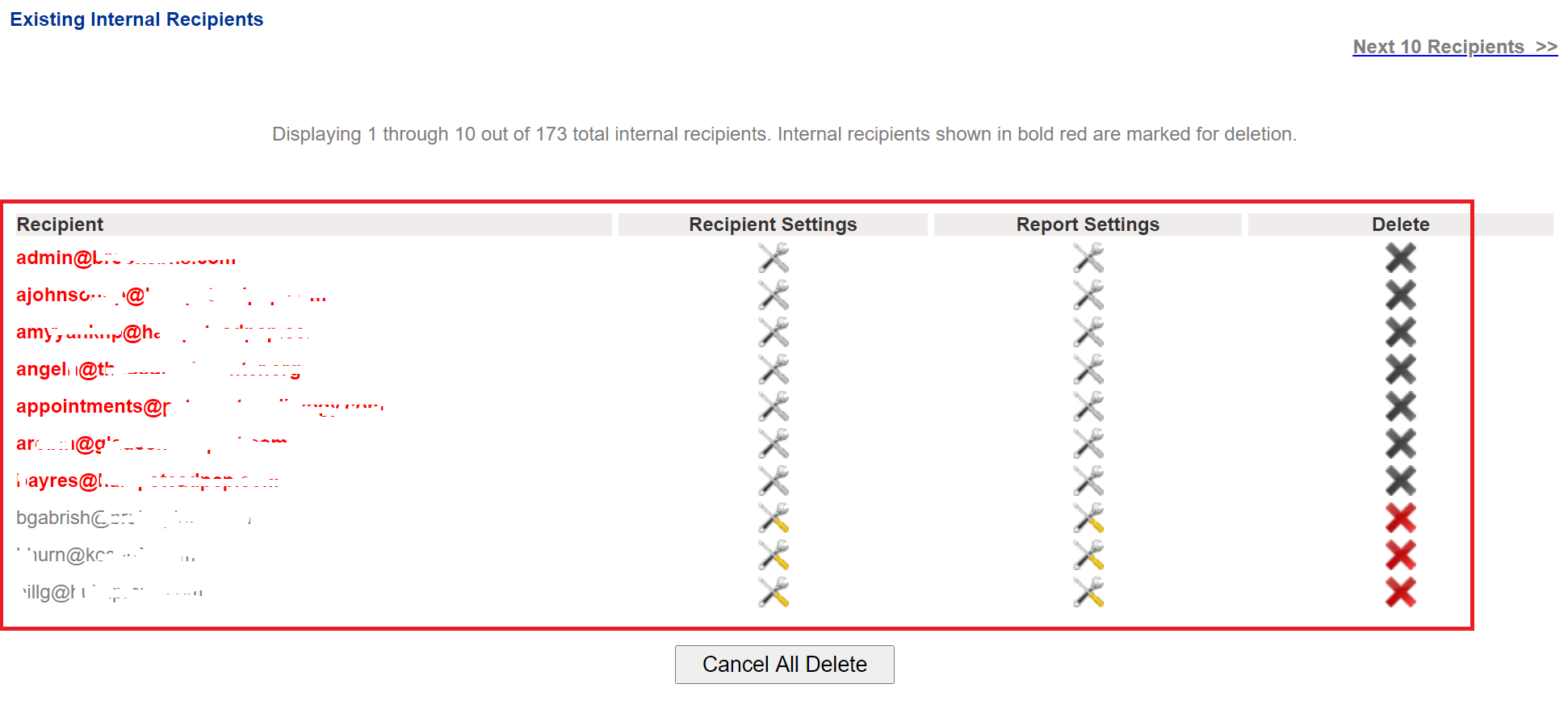
If you selected **Delete**, you should have a listing of the e-mail addresses contained in your .csv file highlighted in <span style="color: #ff0000;">**bold**</span> **<span style="color: #ff0000;">red </span>**under the **Existing Internal Recipients** section (**Figure 7**):

**Figure 7**

[![image-1612826907629.png](https://docs.deeztek.com/uploads/images/gallery/2021-02/scaled-1680-/image-1612826907629.png)](https://docs.deeztek.com/uploads/images/gallery/2021-02/image-1612826907629.png)
Verify that the e-mail address listing is correct and then click on the **Apply Settings** button at the bottom of the page to finish (**Figure 8**):

**Figure 8**

[![image-1612106664256.png](https://docs.deeztek.com/uploads/images/gallery/2021-01/scaled-1680-/image-1612106664256.png)](https://docs.deeztek.com/uploads/images/gallery/2021-01/image-1612106664256.png)
<p class="callout warning">If you are performing a bulk delete and you are deleting a lot of e-mail addresses, the operation can take a very long time to complete after you click the **Apply Settings** button. Please be patient and do NOT navigate away from Internal Recipients page until the operation has finished.</p>

### Support

Support can be obtained by visiting our [Community Discussions](https://github.com/deeztek/Hermes-Secure-Email-Gateway/discussions/) on Github.